An Affidavit of Proof of Service is a sworn statement attesting that required legal notices or pleadings were properly served on the opposing party or parties. It is a mandatory attachment in many court filings under the Rules of Court when service is made by registered mail or substituted service, and it is equally important in land registration proceedings where notice to all interested parties must be proven. Without it, a court may refuse to act on the filed pleading.
Legalia automates the drafting. This tutorial walks you through the complete process of generating a notary-ready Affidavit of Proof of Service online — from logging in to saving a print-ready PDF — in five steps.
Generate Your Affidavit of Proof of Service — Paid Document
This document is a paid feature. Unlock it for a one-time ₱199 (30 days, no subscription), or get the All-Access pass for unlimited generation, PDF export, and AI-assisted drafting.
Unlock This Document — ₱199What you need before you start
- A paid Legalia plan — unlock this document or get All-Access
- The server's (affiant's) full name, civil status, and complete address
- Description of the document served (e.g., pleading title, motion, notice)
- Date of service and manner of service (personal, registered mail, or substituted)
- Full name and address of each person served
- The case title, court/branch, and docket number (if applicable)
Step 1: Log In and Open Your Dashboard
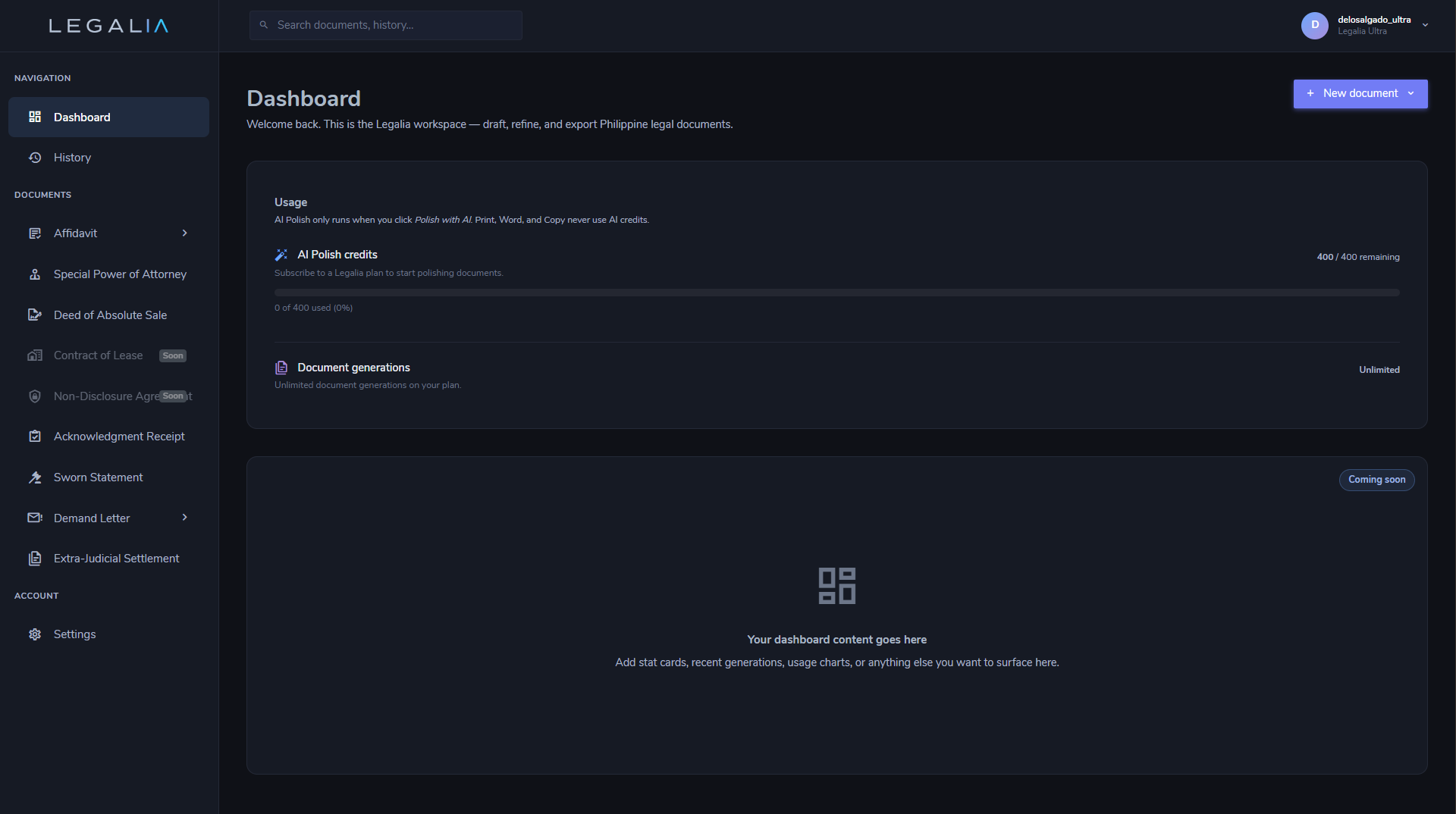
Sign in to your Legalia account at https://legalia.ph. After logging in you will land on the document library dashboard, which lists all available document types grouped by category — Affidavits, Contracts, Deeds, and more.
Step 2: Select Affidavit of Proof of Service
Under the Affidavits category, click Affidavit of Proof of Service. The document editor opens in a two-panel layout:
- Left panel — the guided form with all required and optional fields
- Right panel — the live document preview, updated in real time
Every change you make in the form is immediately reflected in the preview — you always see exactly what will print.
Step 3: Fill In the Form
Complete the fields on the left panel. The form is divided into three sections:
Affiant Information
| Field | Notes |
|---|---|
| Full Name | The person who actually effected service — exactly as it appears on a government-issued ID |
| Civil Status | Single / Married / Widowed / Legally Separated |
| Address | Complete residential or office address including barangay, city/municipality, and province |
Service Details
| Field | Notes |
|---|---|
| Description of Document Served | Full title of the pleading, motion, or notice that was served — e.g., "Answer with Counterclaim," "Motion to Dismiss" |
| Date Served | The date the document was actually delivered or mailed |
| Manner of Service | Personal service, registered mail, or substituted service — select the applicable mode |
| Name and Address of Person Served | Full name and complete address of the party or counsel who received the document |
Purpose / Case
| Field | Notes |
|---|---|
| Case Title | Full title of the case as captioned in the pleading |
| Court / Branch | Name and branch of the court or agency where the case is pending |
| Docket Number | Optional. Include if a docket number has been assigned |
Step 4: Review the Live Preview
The right panel shows the document exactly as it will print. Review the full text carefully — especially the affiant's identity, the document served, the manner and date of service, the recipient's details, and the jurat block at the bottom.
An optional tool appears at the top of the preview panel:
- Polish with AI — rewrites the service description in formal legal Philippine English while preserving all facts. Useful when details were entered in casual language.
Step 5: Print or Save as PDF
When the document looks correct, click the Print button in the action bar. Your browser's print dialog opens.
- To print on paper: select your printer and click Print.
- To save a PDF: change the Destination to Save as PDF. The output is a clean document with no UI chrome, headers, or footers — formatted for standard 8.5×11 or A4 paper with correct margins and line spacing for notarial use.
Bring the printout to your commissioned notary public for the affiant's oath and signature, then attach to the corresponding pleading or filing as required.
That is the complete workflow — from opening the dashboard to a notary-ready Affidavit of Proof of Service.
Generate Your Affidavit of Proof of Service — Paid Document
This document is a paid feature. Unlock it for a one-time ₱199 (30 days, no subscription), or get the All-Access pass for unlimited generation, PDF export, and AI-assisted drafting.
Unlock This Document — ₱199